Verso PDF Editor
Fast viewing, markup and bid-form filling for construction plan sets. Finds the blanks on printed forms and compares revisions by content. 30-day free trial, no card required.
Try free, then buy when you're ready
🔒 Secure checkout · Instant delivery
Verso PDF Editor is built for the subcontractor who has a 600-sheet spec open, a bid form due Friday, and no patience for a PDF tool that takes ten seconds to turn a page.
Plan sets that open and stay fast
Pages render with PDFium behind a memory-budgeted cache, so scrolling a large set feels like scrolling a small one. Rendering follows your display scale, so text is sharp on a 4K monitor instead of upscaled. Bookmarks, search and print are built for working through a spec volume, not a one-page letter.
Bid forms filled the way they are actually drawn
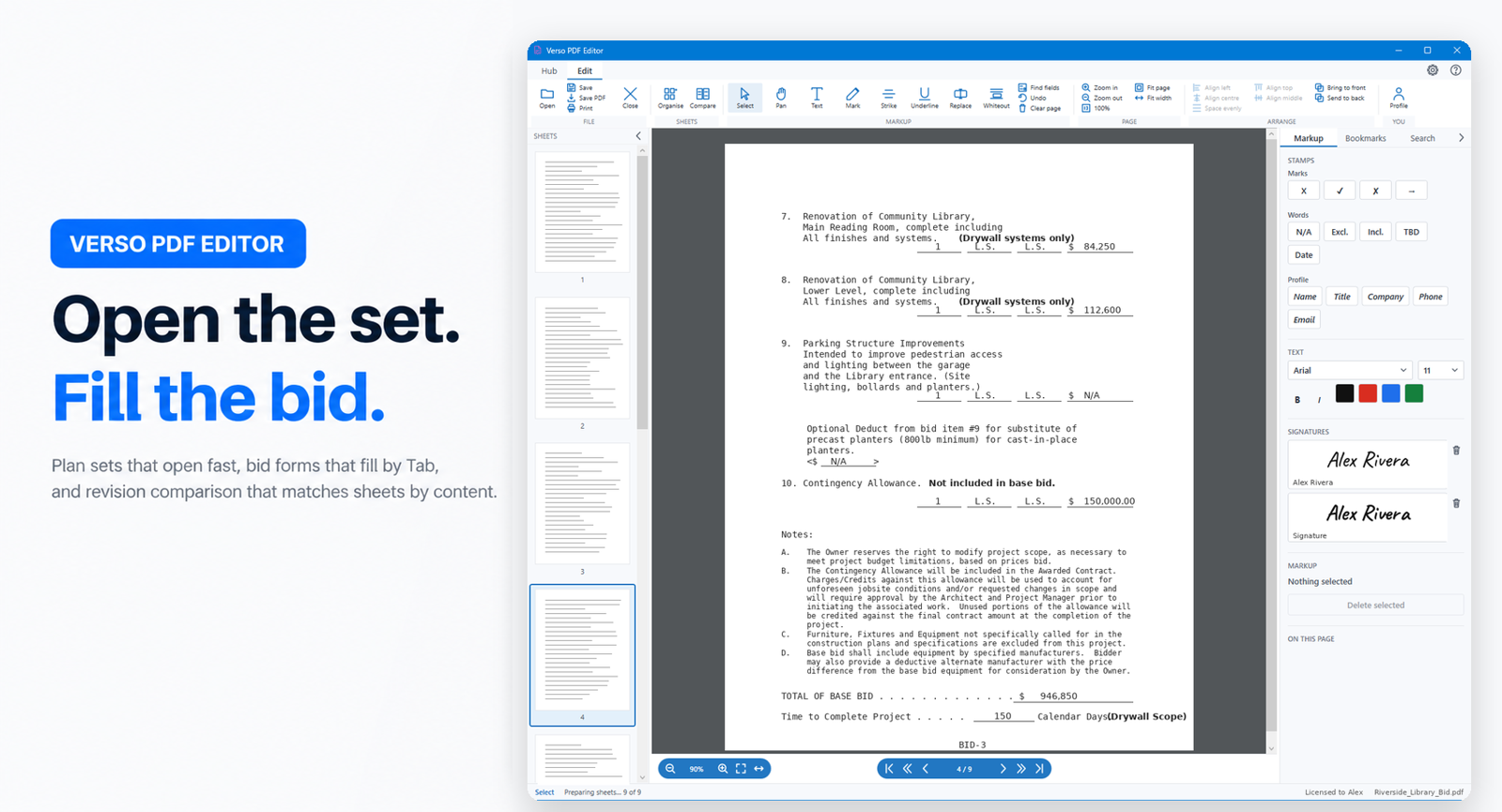
Most bid forms from GCs are not fillable PDFs. They are printed forms with blanks drawn as underscores, ruled lines and table cells. Verso PDF Editor finds those blanks, lets you Tab between them, and drops a tick, an X, a date or your company details in one click. Sign with a typed, drawn or imported signature. Export flattens everything into the page so the recipient sees exactly what you typed, in any reader, on any platform.
Markup that lands where you put it
Text, highlight, whiteout, strike-out and underline. Marks are stored in page coordinates, not screen pixels, so they sit in the same place at any zoom and on any monitor. Markup autosaves as you go; a crash mid-review costs nothing.
Compare two revisions by content, not by sheet number
When a GC reissues drawings with an addendum, sheets are matched by what is on them. One inserted sheet does not make everything after it read as changed. Differences are boxed on both revisions side by side, and a one-click report saves the comparison as a page you can email.
Scanned sheets, read on your machine
A sheet that is only a picture of a page says so, and one click reads it with Windows' own text recognition. Nothing is uploaded anywhere. After that, search, blank detection and text replacement all work on it, and saving writes the recognised text into the PDF so it is searchable in any reader.
Organise sheets
Pull sheets in from another PDF, drag them into order, and drag a selection straight to the desktop to save it as its own file. Marks and bookmarks follow their sheets when you reorder or delete.
Windows 10 and 11. Self-contained install, nothing else to download. Try it free for 30 days.
- Go to any sheet by its number: press Ctrl+G or click the sheet label, type "a402" and press Enter
- Back and Forward after a jump (Alt+Left and Alt+Right) return you to the sheet and zoom you left
- Mark a sheet reviewed with Ctrl+R: a green tick on the thumbnail and in the outline, so the gaps in a long set are easy to spot
- Step between reviewed sheets with Alt+Up and Alt+Down, or jump to the next sheet not yet reviewed with Alt+N
- Detail and section callouts are links: click "7 / A-702" on a plan and you land on that detail at 100%
- Search results, Organise and Print show sheet numbers instead of page counts
- Search results appear as they are found, and a new search can replace one that is still running
- Print asks which sheets first: all of them, this sheet, the reviewed ones, or a range typed in sheet numbers such as "A-401 to A-410, A-501"
- My sheets on the Sheets tab pulls a trade's sheets out by discipline and title words, then prints them or saves them as one PDF
- A pick can be saved by name, so the next set from the same architect takes one click
- Shade the strip counts your trade's words on every sheet and colours the thumbnails by how much of your work is on each
- Check for updates now downloads the new version and installs it, with the release notes shown first
- Screen readers can now read the ribbon, the side panel and the sheet strip
- Large plan sets open fast: the first sheet is on screen in about a second instead of waiting for every thumbnail
- Closing the window while a big file is still loading no longer freezes the app
- Reopening a plan set you have opened before fills the sheet strip in seconds - thumbnails are remembered between sessions
- Turning pages and zooming stay responsive while thumbnails are still being prepared
- Zoom responds at once: the sheet resizes immediately and sharpens a moment later
- Ctrl + mouse wheel zooms on the spot under the pointer instead of the middle of the sheet
- Ctrl + drag a box on the drawing to zoom straight into that area (over marks it still selects them)
- Thumbnail progress now shows in the SHEETS header with a count and a full-width bar
- PDFs opened from email or a browser download no longer fail while another program is still holding the file - the app waits and opens it
- Long documents with no bookmarks open on the Search tab, as intended
- Stamp size sits on the STAMPS header - set it once and every stamp lands at that size (Ctrl+] / Ctrl+[ too)
- Drag a stamp's corner to scale it; later stamps follow that size
- Size and colour changes apply to everything selected, not just one mark
- Ctrl+A selects every mark on the sheet
- Undo now works for moves, resizes, group moves and Clear page
- Align, space evenly and restack live in ON THIS SHEET; the Arrange tab is gone
- Open, Save, Save PDF, Print and Close are on both Read and Markup, in the same place
- Compare folds the side panel and shows differences as an amber highlight on both sheets
- Keep as marks writes a sheet's differences into the file for the export
- Organise sheets: icon toolbar, right-click menu, Move to front / end, Del and Ctrl+Z
- Right-click menus match the app, with icons
- Settings shows the licence: who, product, expiry with days left, seats, copy key
- Notes: pin a comment anywhere on a sheet, signed with your name and dated
- Comments tab lists your notes and every comment the file arrived with, by sheet
- Notes export as real PDF comments - open in Acrobat with the text showing, reply-able
- Read, Markup and Sheets ribbon tabs; Arrange appears only when a mark is selected
- Ribbon folds to its tabs (double-click a tab or Ctrl+F1)
- Side panel sections fold; the tool you pick opens the one it needs
- Zoom and paging centred under the sheet
- PDFs whose content is all annotations (Acrobat markup exports) now render instead of showing blank pages
- Scanned sheets no longer show a banner; the offer to read text sits in the status bar and Search
- Fillable forms now display their field values
- First release of Verso PDF Editor
- Fast viewing of large plan sets with a memory-budgeted page cache
- Finds the blanks on printed bid forms and fills them by Tab
- One-click stamps for ticks, dates and your company details
- Typed, drawn or imported signatures
- Text, highlight, whiteout, strike-out and underline markup
- Replace existing text on a page
- Flattened export that looks identical in every PDF reader
- Revision comparison that matches sheets by content, with an emailable report
- On-device OCR for scanned sheets using Windows text recognition
- Sheet organiser with drag-and-drop and pull from other PDFs
- Bookmarks, search and print
- 30-day free trial