Verso Doc Compare
Verso Doc Compare is a document comparison tool that allows users to quickly identify differences between two PDFs or spreadsheets. It displays changes side by side, enabling efficient review and analysis of modifications.
🔒 Secure checkout · Instant delivery
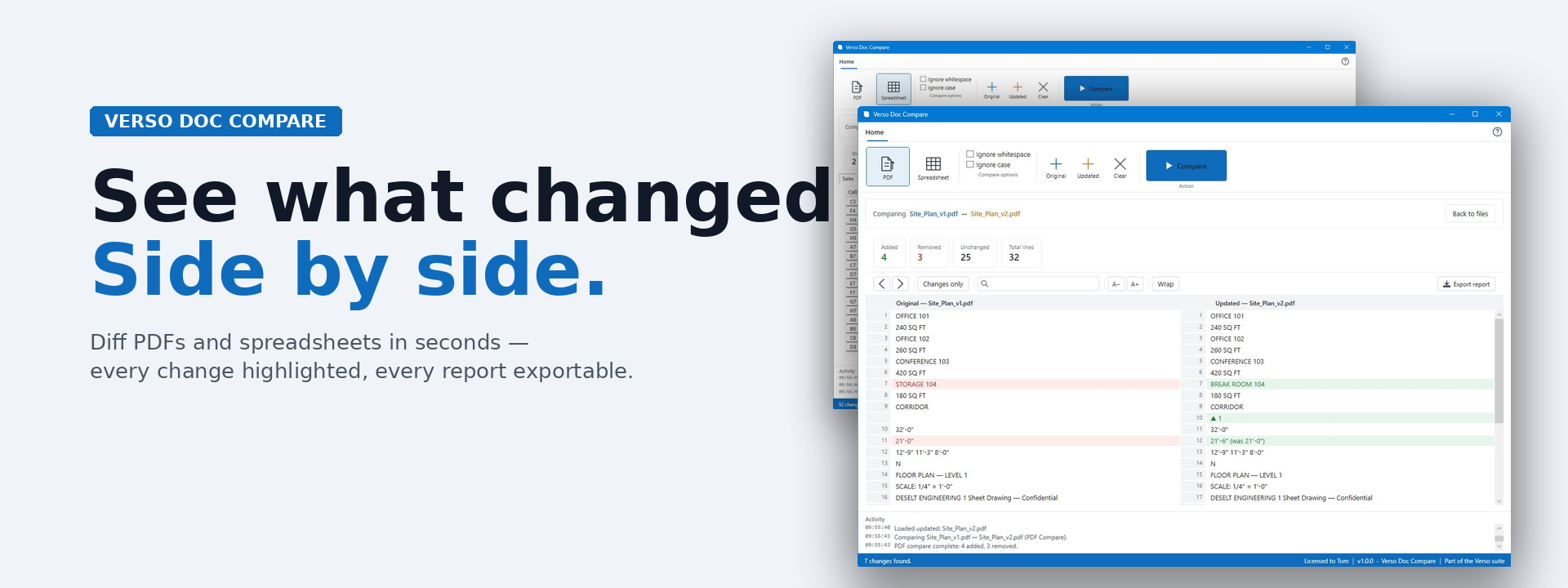
Start writing your product description hVerso Doc Compare shows you exactly what changed between two documents.
Drop your original and updated files into the side-by-side panes, click Compare, and Verso highlights every difference: green for additions, red for removals, plain for unchanged. PDFs render line-by-line. Spreadsheets diff cell-by-cell across every sheet.
When a contractor sends a revised drawing, when a client returns a marked-up contract, when an accountant sends back a corrected workbook - you stop hunting for the changes and start reviewing them.
Why Verso Doc Compare
Built for the moment a "v2" lands in your inbox. No subscription, no cloud upload, no waiting for a service to process your files. Everything runs on your machine.
What's inside
PDF compare with line-level diff, change-only filter, prev/next change navigation, in-document find, and adjustable font size and line wrapping.
Spreadsheet compare for .xlsx, .xls, .xlsm, and .csv files. Per-sheet tabs, cell-level highlighting, change counts in tab badges, and side-by-side old/new values.
Export styled .xlsx reports of any comparison - share with reviewers or attach to a revision email.
Drag-and-drop, recent files, ignore-whitespace and ignore-case options, automatic update checks.
Part of the Verso suite of paid Windows desktop tools.
- First release. Side-by-side comparison for PDFs and spreadsheets.
- PDF compare with line-level diff, change navigation, find, and font/wrap controls
- Spreadsheet compare with per-sheet cell-level diffs (.xlsx, .xls, .xlsm, .csv)
- Drag-and-drop or click-to-browse Original/Updated zones
- Ignore whitespace and ignore case options
- Export styled .xlsx diff reports
- Recent files, automatic update check