Verso Inbox
Turn estimating email into tracked follow-ups with due dates and waiting-on timers.
Try free, then buy when you're ready
🔒 Secure checkout · Instant delivery
Every bid starts as an email. An invitation from a GC, an addendum, an RFI response, a submittal that needs returning by Friday. They arrive mixed in with everything else, and the ones that matter are the easiest to lose.
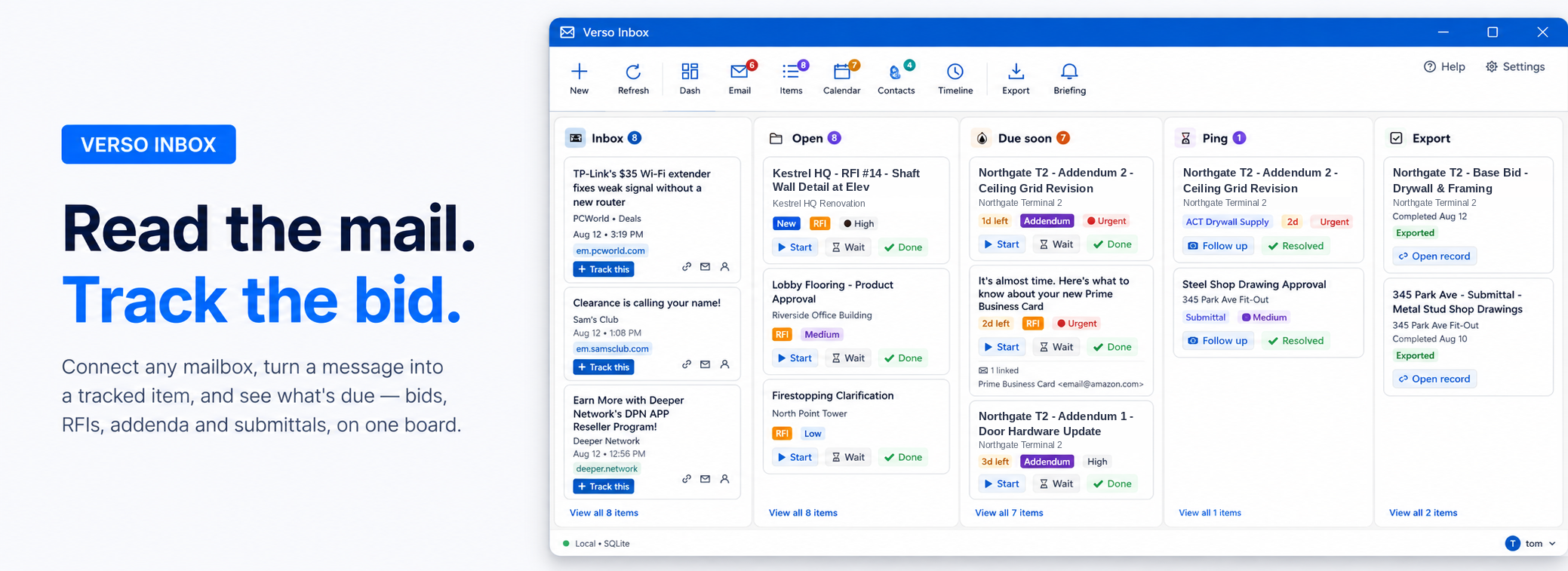
Verso Inbox connects to your mail and turns those messages into tracked items with owners, due dates and a waiting-on timer. One board shows what's open, what's due in the next 48 hours, who owes you an answer and how long they've had it.
Built by an estimator
Verso Inbox is made by a working drywall and framing subcontractor. The categories are the ones on your desk already - Bid, RFI, Addendum, Submittal, Change Order, Buy-Out - and every one of them is yours to rename, recolour or replace.
Two dates, because a bid has two
An internal date for when you need it done, and an external date for when the GC expects it. Verso Inbox tracks both, and the board sorts by whichever lands first.
Waiting on someone
Mark an item as waiting on a supplier or a GC and it moves to its own column with a running count of days. No more wondering whether you chased that quote on Tuesday or a week last Thursday.
Connected to Verso Plans
Link a follow-up to a job in Verso Plans and the board tells you which bid a thread is actually about. If you're estimating in Plans, Inbox knows what you're working on.
Your data stays yours
Runs locally against a SQLite file by default. Point it at your own SQL Server if you'd rather have the office share one database. No cloud account, no per-seat subscription to a service that holds your job history. Credentials are encrypted with Windows DPAPI on your machine.
- First release under the Verso name, replacing InboxTracker
- Link any follow-up to a job in Verso Plans, so the board shows which bid a thread is about
- New Verso ribbon and Office-style interface, matching Verso Plans
- Board sorts by urgency: soonest deadline first, priority breaking ties
- Filter the whole board by priority or type, with one Reset to clear it
- Email passwords are now encrypted with Windows DPAPI instead of stored encoded
- Disconnect now fully removes the saved account, credentials and sign-in token
- The Email page refreshes as soon as you connect an account, no restart needed
- Types, statuses and priorities now follow the order you set in Customize Fields
- Renaming or deleting a field no longer blanks that value on existing items
- Fixed a crash when changing a dropdown while the dialog was still loading
- 7-day free trial, then a single licence key per machine