
FinanceWindowsDesktopFinanceBudgeting
Vaultly - Personal & Business Finance
Vaultly is a personal and business finance software that offers bank syncing, budgeting tools, and AI-driven insights. It helps users manage their finances efficiently by providing a clear overview of their income and expenses, enabling informed financial decisions.
✓
Read-only bank sync via SimpleFIN, Plaid, or OFX/QFX import - no aggregator credentials stored
✓
Auto-categorization with merchant-cleaning rules that learn from corrections
✓
Monthly budgets per category with progress bars and over-budget alerts
✓
Net worth tracking across accounts, real estate, vehicles, crypto, and custom assets
✓
Live crypto prices via CoinGecko - no API key required
✓
Recurring transaction detection with one-click confirmation
$49.00
One-Time Purchase
Try free, then buy when you're ready
OR
🔒 Secure checkout · Instant delivery
What you get
✓
Instant license key by email
✓
Download link immediately
✓
Perpetual license - no expiry
✓
Free minor version updates
✓
Email support
Questions?
Talk to our team
Everything Included
✓
Read-only bank sync via SimpleFIN, Plaid, or OFX/QFX import - no aggregator credentials stored
✓
Auto-categorization with merchant-cleaning rules that learn from corrections
✓
Monthly budgets per category with progress bars and over-budget alerts
✓
Net worth tracking across accounts, real estate, vehicles, crypto, and custom assets
✓
Live crypto prices via CoinGecko - no API key required
✓
Recurring transaction detection with one-click confirmation
✓
Splits, transfers, and reimbursements handled cleanly without double-counting
✓
Debt payoff planner with avalanche / snowball / custom strategies
✓
Retirement planner with monte-carlo scenarios (optional AI integration)
✓
Bill calendar with due-date forecasting
✓
AI Advisor and Planner - bring your own Claude or OpenAI key, data never leaves your machine
✓
Daily automatic backups + manual backup-on-close mode
✓
Dark and light themes with full keyboard shortcuts
✓
SQL Server network mode for multi-user / household setups
✓
One-time purchase, no subscription, license-managed - install on as many computers as your seats allow
About this product
Personal & business finance, without giving anyone your bank password
Vaultly is a Windows desktop app that brings your accounts, budgets, transactions, and net worth into one place - without sending any of it to a SaaS company's servers. Your data lives in a SQLite file on your own machine. You decide what gets imported, what gets categorized, and what gets shared with the AI advisor.
Built for two audiences in one product: people who run their household finances and want a Mint replacement that respects their privacy, and small-business owners who keep books separate from personal but don't need a $40/month Xero subscription.
What's in the box
Bank sync, three ways
Connect via SimpleFIN Bridge for read-only daily refreshes from 10,000+ U.S. and Canadian banks (no Plaid screen-scraping, no Mint-style aggregator dependency). Connect via Plaid for instant authentication on the institutions that support it. Or skip aggregators entirely and import OFX/QFX files directly - the same format your bank's "Download to Quicken" button has been producing for two decades.
Categorization that actually learns
Auto-categorization rules, merchant cleaning, and a pattern engine that turns "AMZN MKTPLC US*XV3W2" into "Amazon Shopping" once and forever. Splits, transfers between your own accounts, and recurring detection are built in - no plugins, no monthly per-feature billing.
Budgets & cash flow
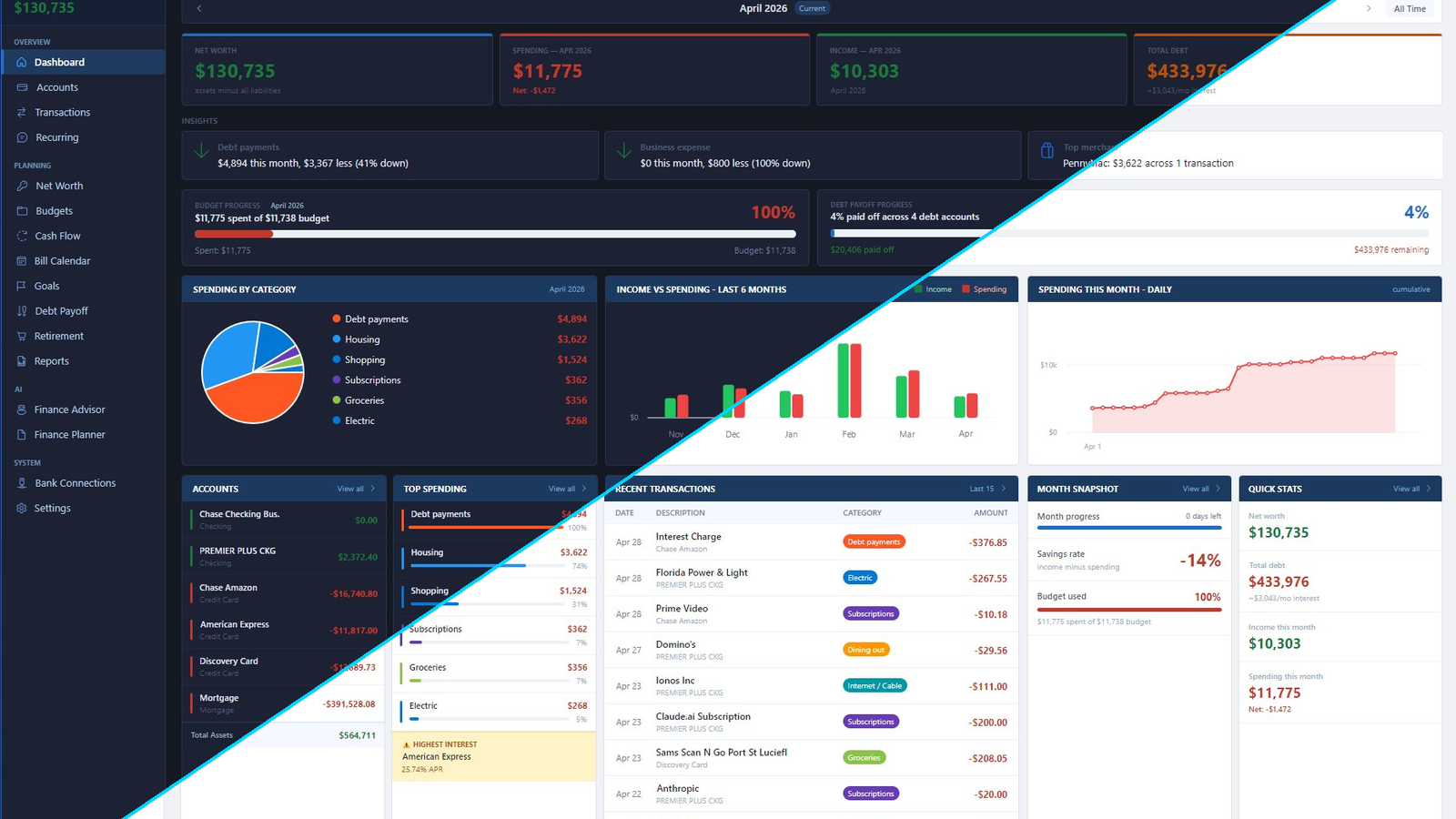
Monthly budgets per category with progress bars, "spent so far" projections, and over-budget alerts. The dashboard shows income vs spending across the last six months, top merchants, daily cumulative spend, and where your debts are landing on the payoff curve.
Net worth & assets
Track real estate, vehicles, crypto (live prices via CoinGecko), and any other custom asset alongside your bank accounts. The Net Worth view shows the trend month-over-month and lets you slice by asset category.
AI Advisor & Planner
Optional. Brings your own Claude or OpenAI API key - we don't proxy through our servers, so your transaction history never leaves your machine until you decide to ask a question. Use the Advisor for "should I refinance my mortgage given these numbers" conversations, and the Planner to generate scenarios ("retire at 60 with 5% returns, $X savings rate, $Y target").
Backup, recovery, and your file
Daily automatic backups to a local folder you control. Manual backup-on-close option for power users. The whole thing is one .db file you can copy to another machine, restore from, or audit yourself with any SQLite browser.
Why desktop, not web
Cloud finance apps work great until they don't. Mint shut down in 2024. Aggregators get sold and "rebrand". A SaaS app that holds your bank credentials is a single point of failure for your entire financial life.
Vaultly is yours: installed on your machine, data on your disk, no subscription. The only thing that talks to a server is the license validation (once a launch, eight-second timeout, falls back to your local cache when offline). Bank sync is read-only and direct.
Pricing
One-time purchase, $49. Includes one year of free updates. After the year, the app keeps working forever - you only pay again if you want the latest features. Try it free for 30 days, no credit card.
Version History
v1.1.0LATEST
Jul 17, 2026
- NEW
- Redesigned dashboard: cash on hand front and center, spending pace vs. a typical month, and a Needs Attention inbox that takes you straight to whatever needs a decision.
- Personal / Business / All switcher in the top bar - scope the dashboard, transactions, budgets, and sidebar to either side of your finances, or see everything together.
- Smarter imports: categorize a merchant once, choose 'Always - create rule', and every future sync arrives pre-labeled. Rules run automatically after each sync.
- Review and uncategorized queues now cover ALL months, with one-click access and Ctrl+Enter to approve the top row.
- Sync all banks from the sidebar (or F5) - when it finishes you land directly on the new imports.
- Add a transaction from any page (+ Add or Ctrl+T), command palette now discoverable (Ctrl+K), and a new Help panel (F1) with every shortcut plus a full in-app guide.
- Category picker: press a letter to jump straight to matching categories; a '- no category -' option makes clearing a category possible.
- FIXED
- Duplicate transactions no longer appear when the same activity arrives via both bank sync and a manual statement import.
- Budgets now respect the Personal / Business switcher and show uncategorized spending honestly.
- Assigning a category reliably marks a transaction as reviewed everywhere.
v1.0.2
May 1, 2026
- Version 1.0.2
- Released April 30, 2026
- License management on the About page
- Settings → About & License now has two new actions:
- Refresh. Force an immediate re-validation against the license server. Useful when your pill has been showing "Offline (cached)" and you want to retry without restarting the app, or after a renewal where you want the client to pick up the new state right away.
- Deactivate this machine. Frees up your seat so you can use the same license on a different computer. After confirming, your local install reverts to a license-entry prompt — you can paste the same key on a new machine, or use a fresh key here later. No support ticket needed.
- Deactivate shows a brief "are you sure?" prompt before doing anything, so an accidental click won't kick you out.
- Compatibility
- No database changes. Your existing transactions, accounts, budgets, and rules carry over unchanged.
- Existing license keys remain valid; no re-activation needed for this update.